
Table of Contents
Free JPEG to PDF Converter Online
Sharing images can be simple, but problems start when you need to submit documents, send official files, or combine multiple images into one clean file. Many forms, emails, and platforms prefer PDFs instead of loose image files. That is where a free JPEG to PDF converter online becomes useful.
If you have ever wondered how can I convert a JPEG to PDF without installing software or dealing with complicated settings, this guide is for you. Below, you will learn what this tool is, why it matters, and how to convert JPEG to PDF easily using ilovepdfapp.com.
What is a Free JPEG to PDF Converter Online?
A free JPEG to PDF converter online is a web-based tool that turns JPEG image files into PDF documents. You upload one or more JPEG images, and the tool converts them into a single PDF or separate PDF files, depending on your choice.
This process does not require any technical skills. You do not need to install software, create an account, or adjust advanced options. Everything happens directly in your browser.
These tools are especially helpful for beginners and everyday users who want quick and reliable results without hassle.
Why You Might Need a Free JPEG to PDF Converter Online
There are many practical situations where converting JPEG to PDF makes sense. Some common reasons include:
- Submitting documents for jobs, schools, or government forms
- Sending scanned images as one organized file
- Printing multiple images in a proper document format
- Sharing photos in a professional layout
- Reducing clutter from multiple image attachments
JPEG images are great for photos, but PDFs are better for documents. PDFs keep the layout consistent across devices and are easier to manage. If you are asking how do I convert a JPEG to a PDF for everyday use, an online converter is often the simplest solution.
How to Convert JPEG to PDF Online Using ilovepdfapp.com
Using ilovepdfapp.com is straightforward, even if you have never used a PDF tool before. The process takes just a few minutes.
Here is a simple step-by-step guide.
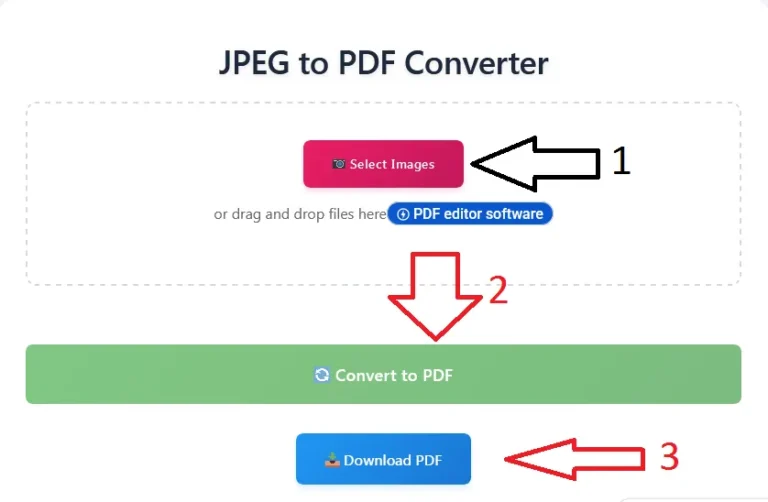
Step 1: Open the JPEG to PDF Tool
Go to the official JPEG to PDF tool page:
Free Convert JPEG to PDF
This page is designed for quick access and easy use.
Step 2: Upload Your JPEG Images
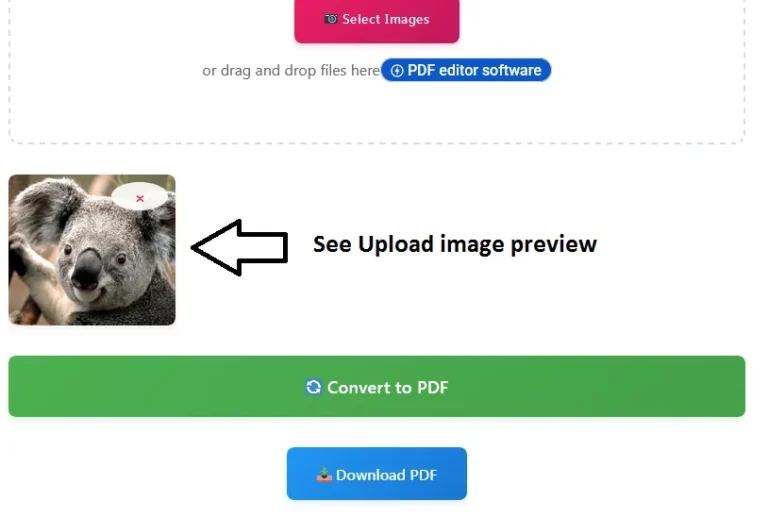
Click the upload button and select the JPEG files from your device. One or more photos can be uploaded simultaneously.
The tool supports standard JPEG files used by phones, cameras, and scanners.
Step 3: Arrange Images (Optional)
If you upload more than one image, you can reorder them before conversion. This is useful when creating a multi-page PDF, such as scanned documents or notes.
Step 4: Convert JPEG to PDF
Once everything looks right, click the convert button. The tool will process your files and create a PDF in seconds.
Step 5: Download Your PDF
After conversion, download the PDF file to your device.Your JPEG images are now neatly packaged into a single PDF document.
That is all. No sign-up, no extra steps, and no confusing options.
Key Features of ilovepdfapp.com for This Task
ilovepdfapp.com is built to keep things simple while delivering reliable results. When you use its free JPEG to PDF converter online, you get several useful features.
- Clean and easy-to-use interface
- Fast conversion with no waiting time
- Supports multiple JPEG files in one conversion
- Works on desktop, tablet, and mobile devices
- No software installation required
- Files processed securely
These features make it a good choice for users who want quick solutions without distractions.
Benefits of Using an Online Tool
Using an online converter instead of desktop software has clear advantages, especially for general users.
No Installation Needed
You do not need to download or update any programs. This prevents compatibility problems and conserves storage space.
Works Anywhere
As long as you have an internet connection and a browser, you can convert JPEG to PDF from any device.
Beginner-Friendly
Online tools are designed for simple use. You do not need to understand file formats or technical settings.
Time-Saving
The entire process takes minutes. This is ideal when you need to send or submit files quickly.
Cost-Effective
A free JPEG to PDF converter online helps you complete tasks without paying for expensive software.
Also try More Tools of Ilovepdfapp.com
Common Questions or FAQs
Q1. How can I convert a JPEG to PDF for free?
You can use an online tool like ilovepdfapp.com. Upload your JPEG file, convert it, and download the PDF without any cost.
Q2. Is online JPEG to PDF conversion safe?
Yes, as long as you use a trusted website. ilovepdfapp.com processes files securely and is designed for safe document handling.
Q3. Can I convert multiple JPEG images into one PDF?
Indeed. Multiple JPEG files can be uploaded and combined in the proper order to create a single PDF document.
Q4. Do I need to create an account?
No. You can convert JPEG to PDF directly without signing up or logging in.
Q5. Will the image quality change after conversion?
The PDF keeps the original image quality, so your text and visuals remain clear and readable.
Final Thoughts
Converting images into PDFs should not be complicated. Whether you are submitting documents, sharing files, or organizing scans, a free JPEG to PDF converter online makes the task simple and efficient.
ilovepdfapp.com offers an easy way to convert JPEG to PDF without technical steps or extra downloads. It is designed for beginners and everyday users who want clean results fast.
If you are looking for a simple answer to how do I convert a JPEG to a PDF, try the JPEG to PDF tool on ilovepdfapp.com today and make your document work easier.
Follow Us on Social Media
Share your experience—let colleagues and friends know how easy it is to protect documents on ilovepdfapp.com!
Connect with us on
- Facebook: I Love PDFApp on Facebook
- Twitter: I Love PDFApp on Twitter
- Telegram: I Love PDFApp on Telegram
- Linkedin: I Love PDFApp on Linkedin
- Pinterest: I Love PDFApp on Pinterest